Gym Viral Video Editing with AI: Friends, in this article I’m going to walk you through a unique and trending video editing style created with the help of AI. This type of content is blowing up on social media right now. Many creators want to make similar gym videos, but most don’t know the exact method. That’s why I’ve prepared a complete, easy-to-follow guide for you. Here, you’ll learn how to edit your own gym clips using an AI-generated Hanuman Ji image. I’ll explain everything step by step. Just read carefully first, then follow the process. Let’s understand it one part at a time.
Details of the Gym Trending Video Style
First, let’s break down how this editing concept works. In this video, a man is seen lifting heavy dumbbells inside a gym. Suddenly, the motion stops, and the video freezes. At that exact moment, a powerful still image appears. This image is created using AI by taking a screenshot from the original video and enhancing it through AI tools. This single image is the heart of the video and the main reason it’s going viral. In the image, the same man is visible, but behind him stands a powerful form of Lord Hanuman. Lord Hanuman’s hand appears to rest on the man’s head, giving a feeling of divine strength and support. This emotional and motivational touch is what makes the video so impactful. In this guide, I’ll teach you how to create a similar AI image using your own video screenshot.
Editing Process Explained
Now, let’s talk about the actual editing. The starting part of the video is completely normal, with no effects at all. The real magic happens only in the image section. So, our main focus will be on creating that AI-generated image. For this, we’ll use Google Gemini, as it delivers high-quality and realistic results. Most people are already familiar with Gemini, so the process is quite simple. In the next part, I’ll explain how to generate the image using a proper prompt. Once the image is ready, you can easily add it to your video and achieve the same viral-style effect.
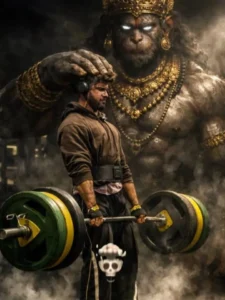
Photorealistic cinematic gym scene, male lifter centered performing a deadlift on a wooden platform, heavy green and yellow bumper plates, muscular physique, realistic sweat and skin texture, dramatic low-key lighting with a strong top/right rim light, deep shadows and contrast, volumetric smoke/fog rising around the feet, ultra-detailed, filmic grain, shallow depth of field, 35mm cinematic lens feel, 4k photorealism. In the background: a colossal, shadowy Hanuman-like guardian spirit towering behind the lifter — enormous muscular primate deity with glowing white eyes, ornate antique gold crown, heavy gold necklaces and bracelets, intricate jewelry details, subtle smoky aura so spirit feels part of the same scene, dark desaturated palette with rich gold highlights, dramatic chiaroscuro, ultra-real textures on metal and skin, sharp detail on weights and gym equipment, cinematic mood, highly realistic, believable lighting and shadows, maintain original posture and expression from reference.
Copy Prompt
2nd Image Prompt:-
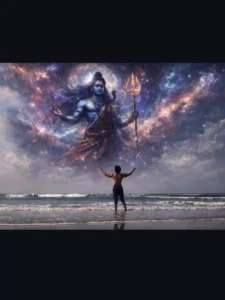
Photorealistic cinematic gym scene, male lifter centered performing a deadlift on a wooden platform, heavy green and yellow bumper plates, muscular physique, realistic sweat and natural skin texture, dramatic low-key lighting with a strong top/right rim light, deep shadows and high contrast, volumetric smoke and fog rising around the feet, ultra-detailed, filmic grain, shallow depth of field, 35mm cinematic lens feel, 4K photorealism.
In the background: a colossal, shadowy Lord Mahadev (Shiva) guardian spirit towering behind the lifter — an enormous, powerful divine figure with a calm yet intense expression, glowing white/blue eyes, long flowing matted hair (jata) tied with a crescent moon, subtle Trishul silhouette, sacred rudraksha malas around the neck and arms, faint ash (vibhuti) texture on the body, intricate spiritual detailing, and a soft ethereal smoky aura so the deity feels naturally blended into the same scene.
Dark, desaturated cinematic palette with cool blue-grey tones and subtle silver highlights, dramatic chiaroscuro lighting, ultra-realistic textures on skin, sweat, metal weights, and gym equipment, believable shadows and reflections, sharp detail on weights and platform, cinematic mood, highly realistic and grounded, maintain original posture and facial expression from the reference, no face reshaping, no beautification, natural proportions.
Copy Prompt
How to Create Your Image
Friends, if you want to make this image, you’ll need to use Gemini. First, copy the prompt provided below the image. After that, click the “Create Image” button, which will take you to the Gemini website. This is where the image will be generated.
Now, paste the copied prompt into Gemini. Next, add a screenshot from your own video by clicking the plus icon. Remember, the screenshot must be taken from your own video—don’t use any other image. Once everything is added, click the send button and wait for a few seconds. Your image will be generated, featuring Hanuman Ji’s hand placed on your head, with Hanuman Ji appearing in the background.
Conclusion
That’s how you can also create your own viral image with Hanuman Ji. After the image is ready, you can use any video editing app to place it at the start of your video clip and apply a shake effect for extra impact. Your video will then be complete. In this way, you can easily create both the image and the video. I hope this prompt helps you and makes Hanuman Ji video editing simple for you. If you enjoyed this article, please share it with others.