Holi AI Video Editing 2026 – Hello friends! In today’s article, I’m going to show you how to create an amazing Holi-themed AI video. Ever since AI tools became popular, people have started editing videos in creative, funny, and completely new styles. With AI, you can now generate almost any type of video within minutes. The best part? These videos look incredibly realistic.
The Holi video I’m talking about today is created entirely using AI. You may have already seen similar clips on social media—they look super real, a little dramatic, and even funny. These videos are going viral everywhere, but most people don’t know how they’re actually made. Don’t worry! After reading this article, you’ll understand how to create your own AI Holi video, even with your own face in it.
Breakdown of the AI Holi Video
Let’s understand what happens in this trending video.
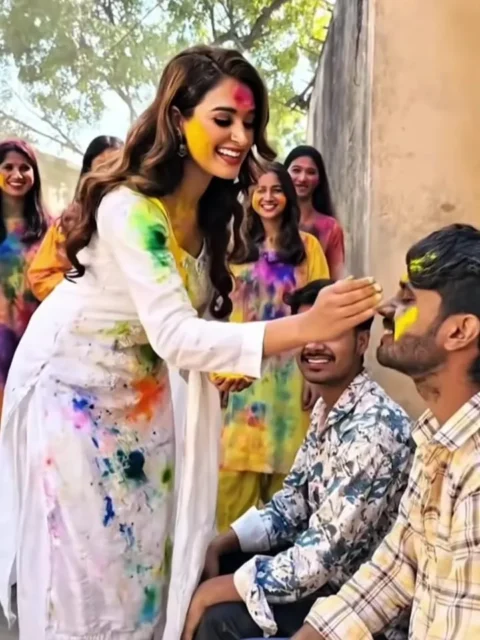
The scene starts in a village setting where two boys are sitting outside a house. Suddenly, a black SUV pulls up. A girl dressed in white Holi clothes steps out, holding colorful abir in her hands. She walks toward one of the boys, talks to him sweetly, and gently applies gulal to his cheeks. After that, the scene shifts to everyone celebrating Holi together with colors and joy.
What makes this video special is how realistic it looks. The expressions, the environment, and even the small details feel natural. The surprising part? You don’t need complex editing skills. You can create this entire video using a well-written AI prompt. There’s no heavy editing required—just generate the video directly through AI tools. I’ll guide you through the full process step by step.
Why Is Holi AI Video Editing 2026 Going Viral?
There are a few big reasons why this trend is exploding online.
First, the video looks incredibly real and entertaining. People love watching creative Holi content, especially as the festival approaches. Since Holi is just around the corner, viewers are actively searching for festive videos.
Second, the emotional and funny angle makes it even more appealing—especially to single guys. In the video, the girl talks affectionately and expresses love, which grabs attention instantly. Many people find it cute, funny, and relatable.
And here’s the interesting part—now anyone can create a similar video featuring themselves or even make a fun version for a friend. AI tools have made this process simple and accessible. You don’t need professional editing skills anymore.
So if you want to create a personalized Holi AI video for yourself, surprise your friends, or just make something funny and trending, you can easily do it. In the next section, we’ll discuss exactly how to use AI to create this viral Holi video.
Note: Please be aware that certain CapCut templates might not load in some countries because of regional limitations set by the app. If clicking the template doesn’t work, wait a while and try again, or access it straight through the official CapCut application. The link provided will redirect you to the original CapCut template in a separate tab. We are not connected or partnered with CapCut in any way—ownership and rights remain with their respective holders, and the link is shared solely for your convenience.
Use uploaded photo as main subject (boy sitting, same face and outfit unchanged). Bright Indian Holi festival daytime. A colorful car arrives in slow motion, decorated with gulal. Behind it, joyful girls run throwing pink, yellow, and blue colors in the air. Car stops near the boy. A girl wearing white salwar kameez with Holi colors on her clothes steps out, walks to him smiling, gently applies pink color on his cheeks and says “Happy Holi.” Cinematic lighting, slow motion color splash, realistic, 4K, Bollywood festive vibe.
How to Create Your Video
Creating a video with Google Flow AI is actually very simple. If you’re not familiar with the process yet, don’t worry — I’ll walk you through it step by step. Just follow these instructions carefully, and you’ll be able to generate a video using your image and a ready-made prompt in just a few minutes.
Start by copying the prompt provided on the website.
Next, click on the “Generate Your Video” button, which will take you to the Google Flow website. Once you’re there, sign in to your account.
After logging in, click on “New Project.” Inside the dashboard, choose the “Text to Video” option, and then select “Frame to Video.”
Now, upload your image and paste the copied prompt into the dashboard.
Finally, hit the “Generate” button and wait a few moments while the system processes your request.
Your video will be created automatically. Keep in mind that the final result depends on the prompt you use, so make sure it matches the style or effect you want.
Conclusion
Now you’re ready to create a Holi video featuring your AI girlfriend and share it with your friends. They’ll be surprised and probably curious about how you made it!
If you’re interested in learning more AI video editing tricks like this, explore our website and check out the AI category for more helpful guides. And if you found this method useful, feel free to share it with others who might enjoy it too.