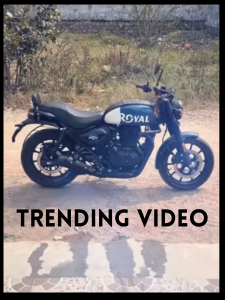
Trending Bike AI Video Editing – Friends, ever since AI entered the creative world, video editing has completely changed. Today, people are using AI tools to create stunning videos in different styles, and many of these videos are going viral on social media. Right now, a motorcycle-based AI video is trending everywhere. This bike video looks impressive, yet it’s very simple to make. You can easily create a similar video using photos of your own motorcycle. Within minutes, your personalized bike video will be ready. In this article, I’ll walk you through the exact steps needed to create this AI-powered motorcycle video. Just follow this guide carefully and start editing your own viral bike video.
Details of the Trending Bike AI Video Editing
In this tutorial, the video starts with a shot of a bike key held in hand. After that, it smoothly transitions to the motorcycle. First, the bike’s wheel appears, then each part of the bike shows up one by one, finally forming a complete motorcycle. The entire sequence looks highly creative and visually appealing. This effect is created using AI with the help of images. To make this video, you’ll need only two photos—one photo of your hand holding the bike key and another clear photo of your motorcycle. Make sure both images are ready before starting. For this editing process, we’ll be using an AI tool called Flow AI, which allows us to convert photos into videos. Let me explain more about this tool.
Edit with Flow AI
Flow AI is an advanced AI tool developed by Google. It can be used for various AI-based tasks, especially video editing. With Flow AI, you can convert images into videos, create videos from text, and do much more. Nowadays, many creators are using this tool to produce eye-catching AI videos. All you need to do is upload an image and add a prompt, and Flow AI will generate a video based on your instructions. For today’s bike video editing, we’ll use two images along with a specific prompt. I’ll provide the prompt and sample images that you can use to create your own AI bike video. Now, let’s move on to the next section, where I’ll explain how to create the video step by step using Flow AI.
Note: In some locations, CapCut templates might not load because of regional limits set by the app. If clicking the template option doesn’t work, wait a while and try again, or access it directly through the official CapCut application. The external link will open the original CapCut template in a new tab. We have no connection with CapCut—ownership and rights remain with the original creators, and we share these links only to make things easier for users.
Copy Prompt
Use first frame as starting reference and second frame as ending reference. Transform the key into the motorcycle smoothly with realistic materialization effect. Maintain exact camera angle and background.Add subtle dust and cinematic motion. Keep the subject position stable. Avoid glitches, avoid stretching, keep realistic lighting and shadows. Ultra realistic.
How to Create Your Video
Friends, making AI videos like this is actually very easy. You just need to follow a few basic steps, which I’ll explain clearly here. First, tap on the “Generate Video” button. This will instantly redirect you to the Flow AI website. Sign in using your email address. After logging in, select “Create Project” to start a new one.
Once the dashboard opens, choose the “Text” option at the bottom. Then select “Frame” and “Video.” Now, click on the “+” icon to upload an image. Below the image section, you’ll see a text box. Copy the prompt shared on my website and paste it there. Finally, hit the “Generate” button. Within a few seconds, your AI video will be ready and will look very realistic. That’s all it takes to create your video.
Conclusion
Friends, this is the complete method to create AI-generated videos using your bike. I’ve explained every step in a simple way so you won’t face any confusion. Keep visiting our website for the latest and trending AI video editing guides. I’ll keep sharing new and exciting tutorials for you.